
Help with structuring and completing your CSEP application.
An eight-stage workflow for mapping your experience to the IfSE framework, drafting specific evidence and checking the result before submission. Setup guidance is included for Claude, ChatGPT and Copilot.
£49. One-time payment, lifetime access, downloadable bundle. An AI account is required. A paid subscription is strongly recommended but not required. Free tiers can work, but usage limits and the available models may make the process slower.
Who this is for
Built for Systems Engineers preparing experience evidence for a CSEP application. SEP Exam Prep supports study for the knowledge exam; this resource supports drafting and organising the experience application. Official eligibility, references and assessment remain outside both resources.
What the Project setup adds: a defined sequence, IfSE-specific reference material and checks for vague or unsupported evidence. A general chatbot does not have that context unless you provide it.
CSEP candidates
Targeting INCOSE Certified Systems Engineering Professional status. You've passed (or will pass) the knowledge exam and now need to evidence your experience.
Engineers re-applying
If you've submitted before and been asked to re-evidence specific competencies, this resource helps you focus on those areas.
Anyone unsure where to start
The IfSE competency framework can be difficult to approach from a blank page. The Helper breaks the work into clear stages and prompts.
Who this is NOT for
This resource is designed for CSEP experience-evidence drafting. It is not an ASEP or ESEP route guide. Check the current official criteria and process for those certifications before choosing a preparation resource.
What you will be able to do
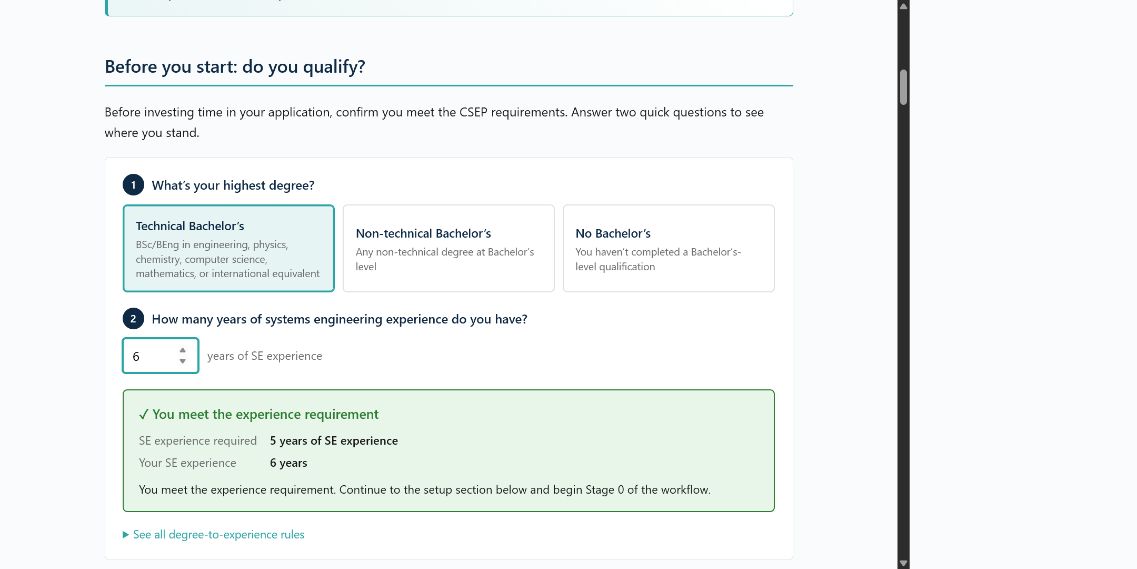
- Make an initial comparison with the published degree and experience criteria, then confirm the current requirements officially.
- Map positions and technical areas without double-counting months.
- Replace vague claims with evidence that identifies your action, context and result.
- Run a structured self-review before entering the final wording in the IfSE or INCOSE system.
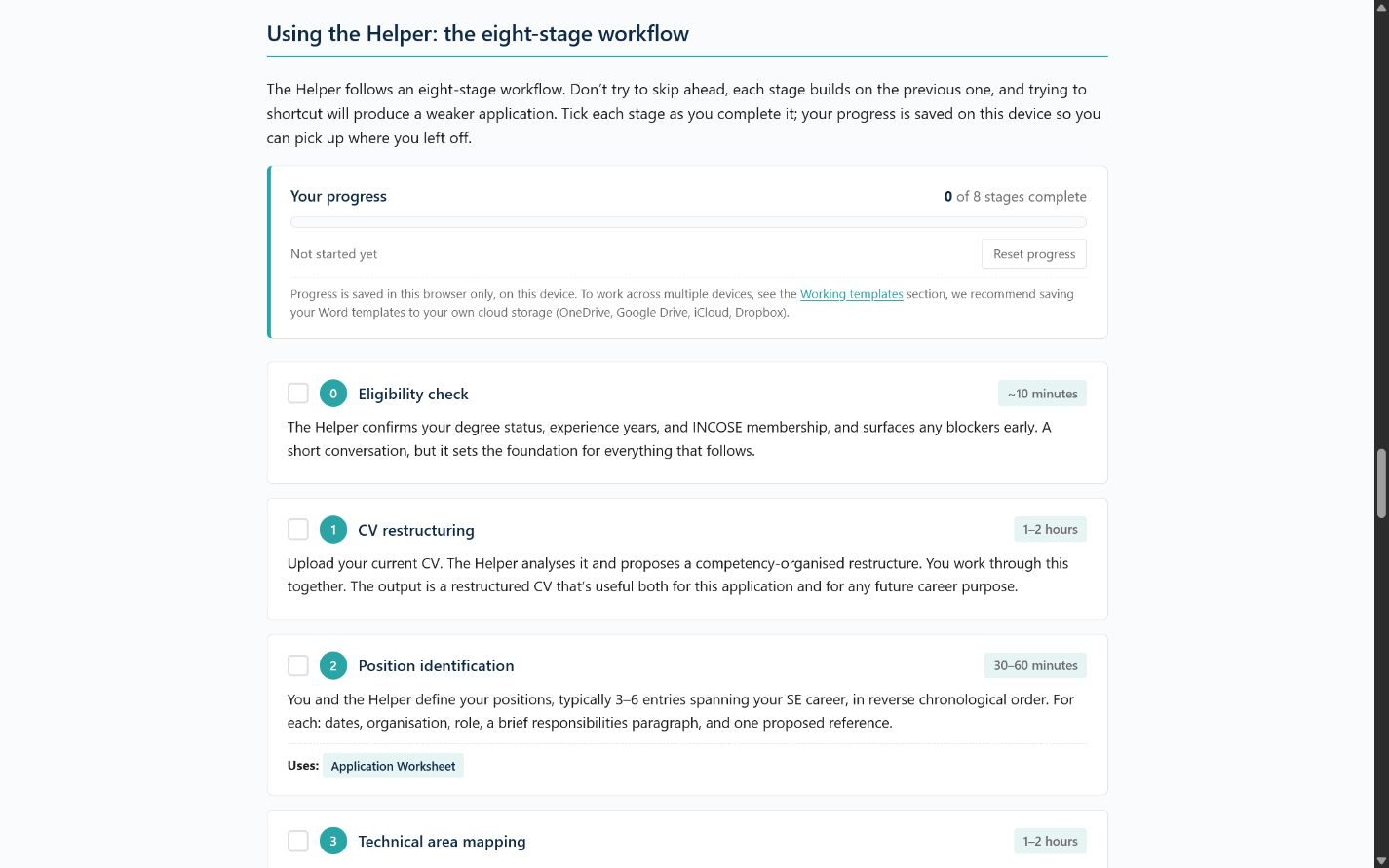
See the CSEP Helper interface
Sample
This short example shows the editing pattern used by the Helper. It is illustrative, not a real applicant statement.
Too vague
“I was involved in requirements management and supported verification activities.”
Evidence pattern
“I baselined [system or subsystem] requirements, chaired [change forum] and traced [acceptance criteria] to [verification evidence], resulting in [specific decision or outcome].”
Your job: replace every bracket with facts you can defend. If the evidence is not personally true, do not use it.
What's in the bundle
A downloadable drafting kit for use during your application. It can be set up in Claude, ChatGPT or Copilot. An AI account is required, and a paid subscription is strongly recommended for fewer interruptions and access to more capable models. Use only an account and service approved for the information you intend to process.
AI Project setup
A pre-configured Project setup (Claude, ChatGPT, or Copilot) that walks you through your application stage by stage.
- Bounded drafting-assistant system prompt
- Eight-stage application workflow
- 8 knowledge files covering the current framework, drafting checks, CV transformation and plain writing
- Pre-loaded with the IfSE competency framework
Drafting and evidence checks
Checks for unclear, unsupported or generic wording using the supplied guidance.
- Unclear personal contribution and unsupported verb choices
- Non-SE work wrongly claimed as SE
- Months that exceed a position’s duration
- Insufficient breadth or depth across the technical areas
Application reference documents
Four Word documents showing the kind of information you may need to prepare.
- CSEP Application Worksheet (11 pages)
- Competency Mapping Matrix (landscape)
- Reference Request Email template
- Self-Review Checklist
These documents are for reference only. Start the official application through IfSE or INCOSE and complete it in their online system. Use these documents only to understand and prepare the information you will enter there.
Setup & use guide
A complete on-page guide walking you through setup and the eight-stage workflow end to end, nothing to install.
- Step-by-step Project setup, with the full system prompt to copy
- Eight-stage workflow walkthrough
- Avoiding disclosure of restricted information
- After-submission and reference timing guidance
How you'll use it
An eight-stage drafting process from an indicative criteria comparison to a working draft. You provide and verify the evidence; the AI organises it against the supplied references.
Indicative criteria comparison
Compare broad degree and experience facts with the current headline criteria, then confirm the requirements with INCOSE or IfSE.
CV restructuring
Restructure an approved, redacted CV using the fields and technical areas in the supplied application guidance.
Position identification
Identify which positions from your career provide the strongest evidence for each competency.
Technical area mapping
Map your technical experience to the IfSE framework's technical areas, identifying gaps.
Activity drafting
Draft activity descriptions that identify your own contribution, the context and the result.
Reference selection
Use current official instructions to map possible references, then confirm eligibility and arrangements with INCOSE/IfSE.
Self-review
Apply drafting and evidence-coverage checks, and list official criteria that still need confirmation.
Final compilation
Organise a working draft for you to verify and transfer into the current official system.
What you'll need to use this
You need an AI account to use the Helper. A paid plan is strongly recommended, but not required. Free tiers can work, although lower limits and less capable models may make setup and drafting slower. Supported options include:
- Claude, the reference platform used to develop the workflow
- ChatGPT, using its project workspace where available
- Microsoft Copilot, using its agent or workspace features where available
Provider features, limits and prices change, so check the current plan details before choosing. Step-by-step written setup walkthroughs for all three platforms are included. Use only a service, account and intended use approved for the information you intend to process. Do not upload classified, protectively marked, export-controlled, commercially restricted or employer-confidential material.
Pricing
CSEP Application Helper
One-time payment · downloadable bundle · no recurring fees
- AI-assisted drafting workflow: system prompt + 8 knowledge files (works with Claude, ChatGPT, or Copilot)
- Drafting and evidence-coverage checks based on the supplied references
- Four Word reference documents for preparing the official online application
- Complete on-page setup & use guide
- Email support for questions about the resource
- Free updates to the bundle as the IfSE framework evolves
One-time payment through secure Stripe checkout. No recurring fees to Systems Engineering Advisory. You supply your own AI account; any paid subscription is purchased separately from your chosen provider.
Frequently asked questions
Practical details about resource scope, AI requirements and access.
Do I need a paid AI subscription to use this?
No. You need an AI account, but a paid plan is a strong recommendation rather than a requirement.
Free tiers can work, but their lower message and file limits may interrupt the workflow, and the available models may be less capable. A paid plan usually makes setup and drafting faster and more consistent. Check the provider’s current limits before choosing.
The setup supports three providers:
- Claude, the reference platform used to develop the workflow
- ChatGPT
- Microsoft Copilot
Features, limits and prices vary. If you choose a paid plan, you pay the AI provider directly and can cancel it when you no longer need it.
Can I use this with ChatGPT or Copilot instead of Claude?
Yes. Setup is slightly different on each platform. Included with your purchase are step-by-step written setup walkthroughs for:
- Claude Projects
- ChatGPT Projects
- Microsoft Copilot Agents
The methodology and knowledge files are the same across all three. The instructions for preparing your application do not change based on which platform you choose.
Responses and limits vary between providers. Choose a service approved for your intended use and that you are comfortable using.
Will this guarantee my CSEP application succeeds?
No. INCOSE or IfSE reviewers make the final decision using your evidence and the applicable criteria. The Helper provides structure and checks, but the evidence must come from your career and remain your responsibility.
Who's building this?
This resource was built by a UK-based, CSEP-certified systems engineer with more than 15 years of engineering practice across complex programmes and first-hand experience of the CSEP application process.
Systems Engineering Advisory is an independent, one-person business. If you have a question, email info@systemsadvisory.co.uk and you will reach me directly.
Should I buy this alongside SEP Exam Prep?
If you're targeting CSEP and haven't yet passed the knowledge exam, the two resources support different preparation tasks. SEP Exam Prep supports knowledge-exam study; this Helper supports drafting and organising experience evidence. Neither resource makes an eligibility decision, supplies references or provides an official assessment.
If you've already passed the exam, you can use this Helper without SEP Exam Prep.